Social media marketing ideas worth using today
Practical guides for creators: planning, captions, analytics, publishing habits, and honest comparisons grounded in workflows Repping.AI can demonstrate.
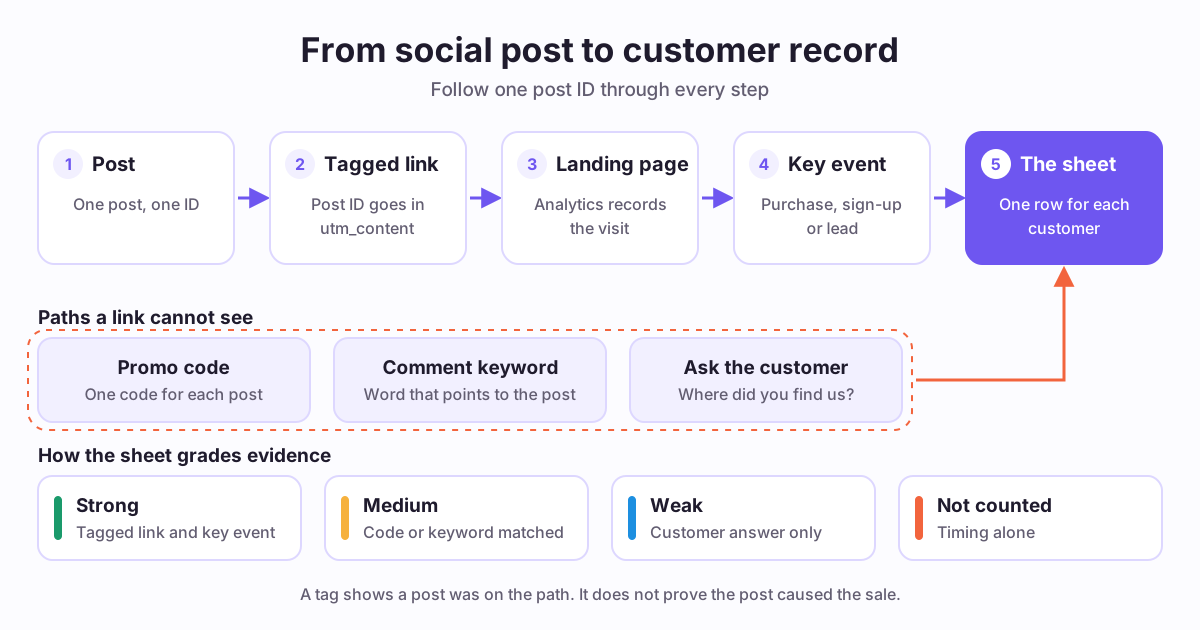
How to Track Conversions From Social Media Posts
To track conversions from social media, give each post its own tagged link, mark the action that matters as a key event, and log each customer in one sheet. Add a code or a question for paths a link cannot see. You get graded evidence, not a perfect answer.
Read the latest articleChoose a learning path
Follow a task from planning through publication and review.
Plan your content
Write and repurpose
Measure your results
Choose a workflow
Guides
To track conversions from social media, give each post its own tagged link, mark the action that matters as a key event, and log each customer in one sheet. Add a code or a question for paths a link cannot see. You get graded evidence, not a perfect answer.
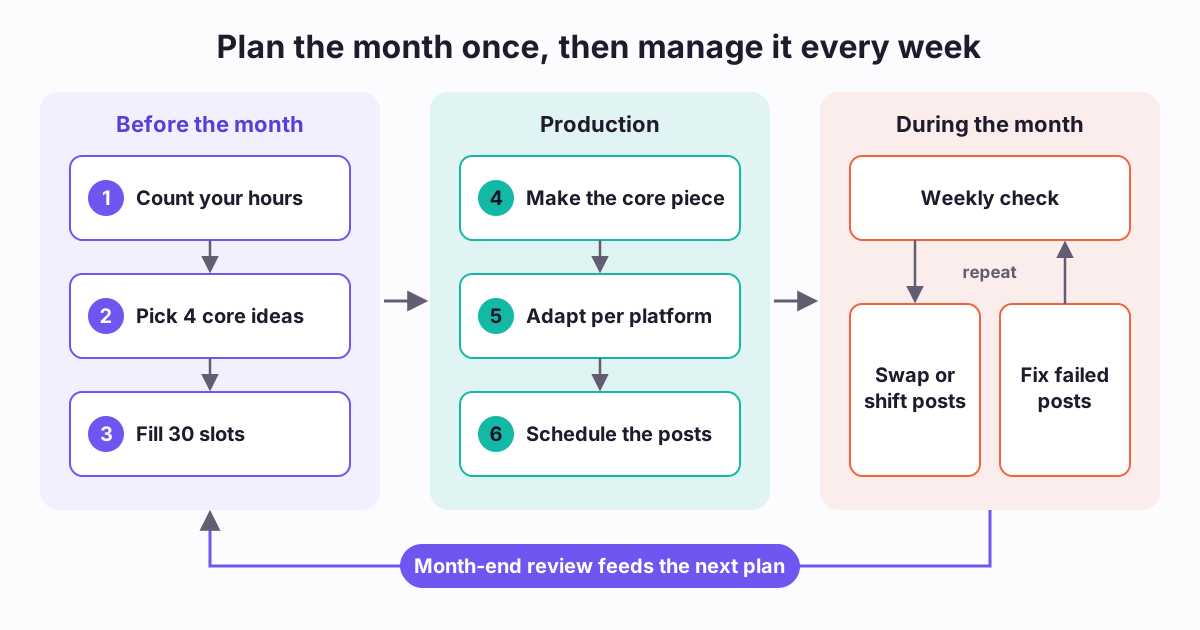
A 30-day social media content plan lists every post for one month with its date, platform, format, and job. Build it from your real hours, using one core idea each week and adapted versions for each platform. Then check it weekly, because open slots and swaps keep the plan working.
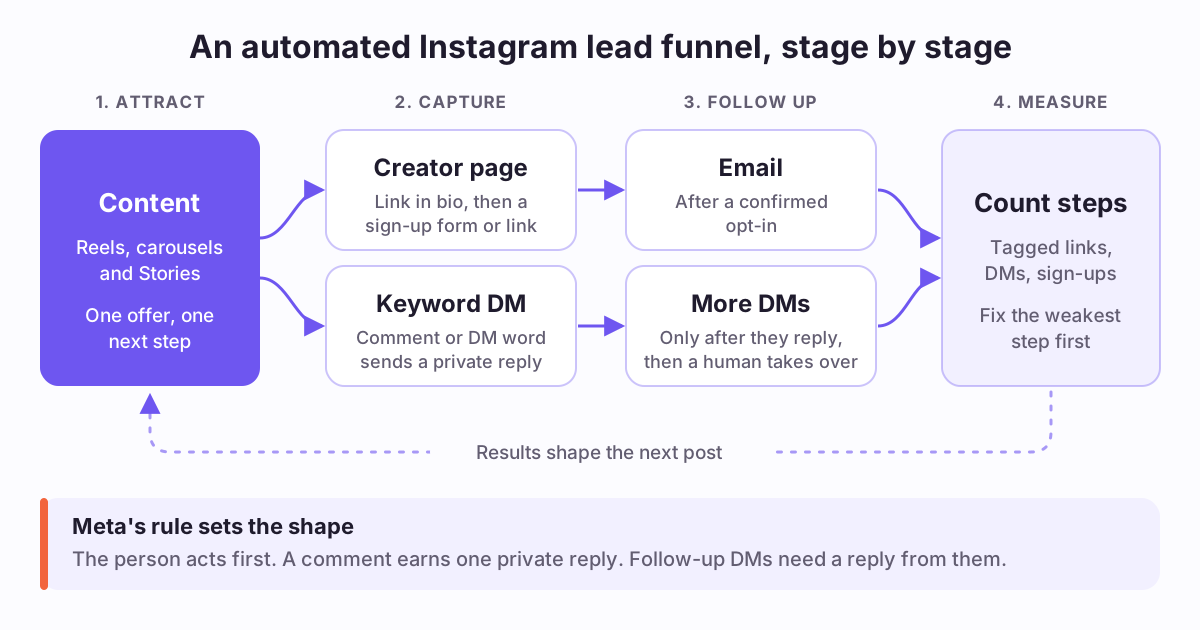
An Instagram lead generation funnel moves people from content to a captured contact, then to follow-up and measurement. You can automate the repeated steps with a creator page, keyword DM replies and tagged links. Meta sets the limit: the person must act first, and each comment earns one private reply.
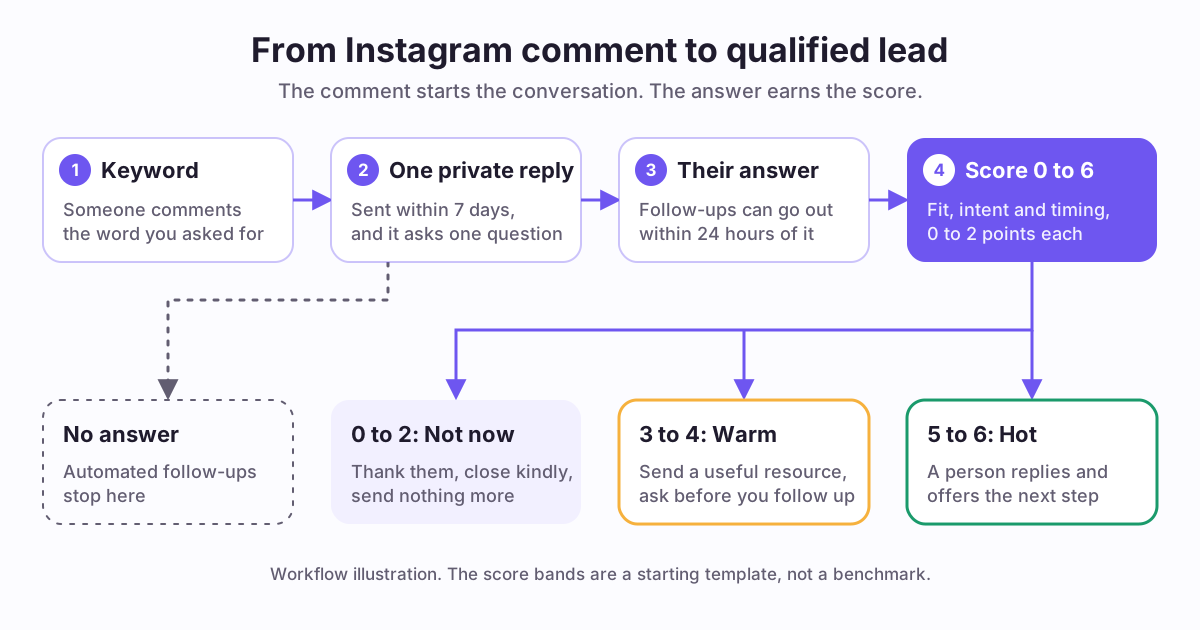
To turn Instagram comments into leads, ask for one keyword, send one private reply, and make that reply earn an answer. Meta allows one private reply to a commenter. Follow-ups need a response, and they must go out within 24 hours of it. Use that answer to score fit, intent and timing.
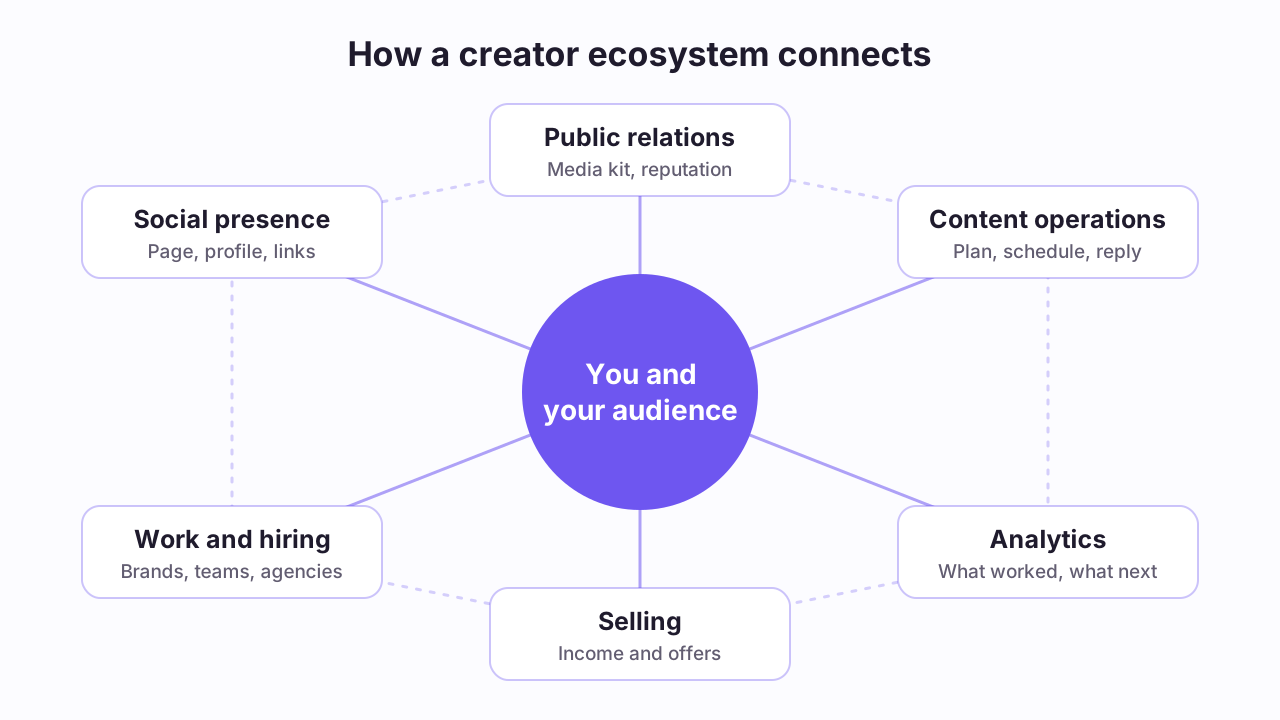
A creator ecosystem is the connected set of people, platforms, tools and income sources around a creator's work. It covers public presence, reputation, publishing, analytics, selling and partnerships. It works best when facts move between those parts, so you do not rebuild the same information in separate tools.

An Instagram content calendar works best as repeatable weekly slots: teach, prove, connect, sell, and review. Start with three to five feed posts or Reels a week plus Stories, repeat formats while changing the angle, and keep one open slot for timely posts and audience replies.
To schedule social media posts, connect your accounts to a scheduler, draft each post once, adapt it per platform, preview it, and choose a publish time. Then check delivery status. Platforms differ: YouTube can publish a private video at a set time, and LinkedIn accepts scheduled posts from 10 minutes to 3 months ahead.

Repurpose video into social media posts by saving five moments that stand alone: a lesson, an opinion, an example, a myth, and a quote. Rewrite the hook and call to action for each platform, then spread the posts across seven days. Quality matters more than count, and five to ten posts is a realistic target.
Waitlist content keeps people informed before launch. State what exists today, share real progress, ask questions, and never promise what you cannot deliver.
Promote a webinar in three stages: explain what attendees learn before the event, remind them near the start, and share a recap and next step afterward.
Good podcast clips are self-contained moments. Choose them from the transcript, cut cleanly, add captions, confirm guest permission, and schedule across platforms.
A newsletter issue holds several ideas. Mark each standalone idea, write it as a post for the platform, link back to the issue, and spread the posts over the week.
A thread works when it makes one claim and supports it in order. Outline the claim, the steps, the opener and the closing action before you write the posts.
Repurposing means making several platform-fit posts from one source. Choose the source, extract single ideas, adapt each one, and schedule them across the week.
A hook test compares two openings of the same idea. Change only the opening, keep topic, format and timing as close as you can, and log the result with its limits.
Plan a carousel as a short story. Choose one idea, write a cover that makes a clear promise, give each slide a single point, and end with one action.
A founder post system turns things you already do, such as shipping, support replies and customer calls, into posts through capture, sorting, batch drafting and review.
A launch calendar maps every post to a phase of the launch. Plan the before, during and after phases, assign a goal to each post, and schedule it with a buffer.
A weekly analytics review is a short, fixed routine: read a few metrics tied to one goal, note what changed and why you think so, then change next week's plan.
A content audit is a structured review of what you already published. Label each post keep, fix, repurpose or retire, then change the calendar to match.

A social media analytics routine means reviewing results once a week, at the same time, and ending with calendar decisions. Group posts by goal, compare them only inside their group, read comments for the reason behind the numbers, then choose one format to repeat, one call to action to fix, and one experiment to run next week.

Use three to five content pillars, each written as an audience problem rather than a broad category. A common mix is expertise, proof, process, personality, and offer. Give every pillar repeatable formats, and review the pillars monthly against saves, replies, clicks, and the quality of the conversations they start.
An AI caption generator for TikTok helps you test sharper hooks and calls to action around a video you already trust. Keep the caption consistent with what the clip shows, avoid promises such as guaranteed growth, and turn on TikTok's commercial content disclosure toggle when you post branded content.
An AI caption generator for LinkedIn is most useful for structure and hooks. Give it your real notes, remove any invented credentials, numbers, or stories, and check the draft against LinkedIn's limit of 3,000 characters per post. Credible posts state one specific lesson and the evidence behind it.
An Instagram AI caption generator should give you hooks, structure, and variations, then leave the editing to you. Give it a specific brief, check every fact against your media, remove invented claims, and disclose paid or gifted partnerships. An AI draft is a starting point, not a performance guarantee.
An MCP server is a standard connector that lets an AI assistant use external tools and data, such as a social scheduler. MCP is an open standard. Its specification says users must consent to tool calls and data sharing, but the protocol cannot enforce this, so safety depends on how each product is built.
No universal best time to post exists. Start with your own audience data, such as YouTube's report of when your viewers are online, then test two or three slots with comparable posts for two weeks and compare results. Treat any published chart as a hypothesis to test, not a rule.
Growing on X comes down to habits you control: a sustainable posting rhythm, strong opening lines, threads for depth, and thoughtful daily replies. X has published parts of its recommendation code, but that code shows no formula for growth, so test each habit on your own account and measure the results.
There is no universal good engagement rate. Compare posts that use the same engagement definition, denominator, format, and period. Engagement divided by followers, reach, or views answers different questions, so label the denominator and judge results against your own account history and your goal.
Playbooks
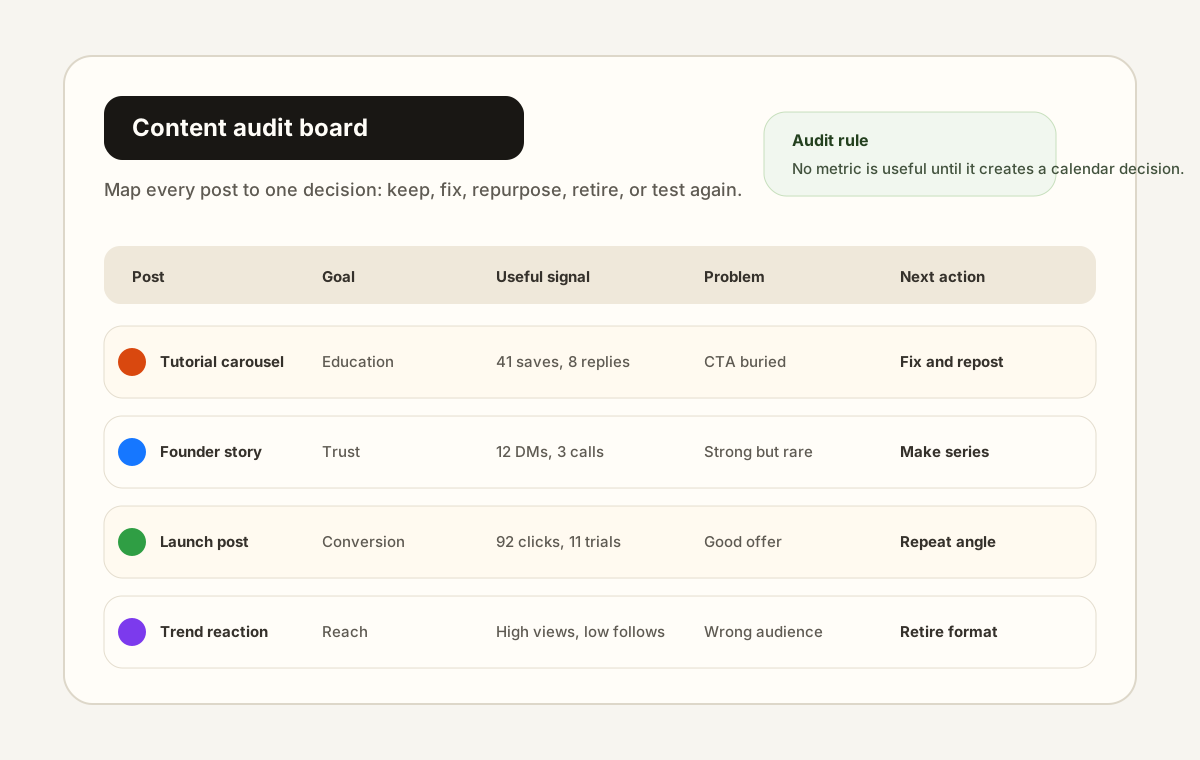
A social media content audit reviews each post against its goal, records one useful and one weak signal, and ends with a decision: keep, fix, repurpose, retire, or test again. Run a light audit monthly and a deeper one after a launch, then turn the decisions into specific changes in next month's content calendar.
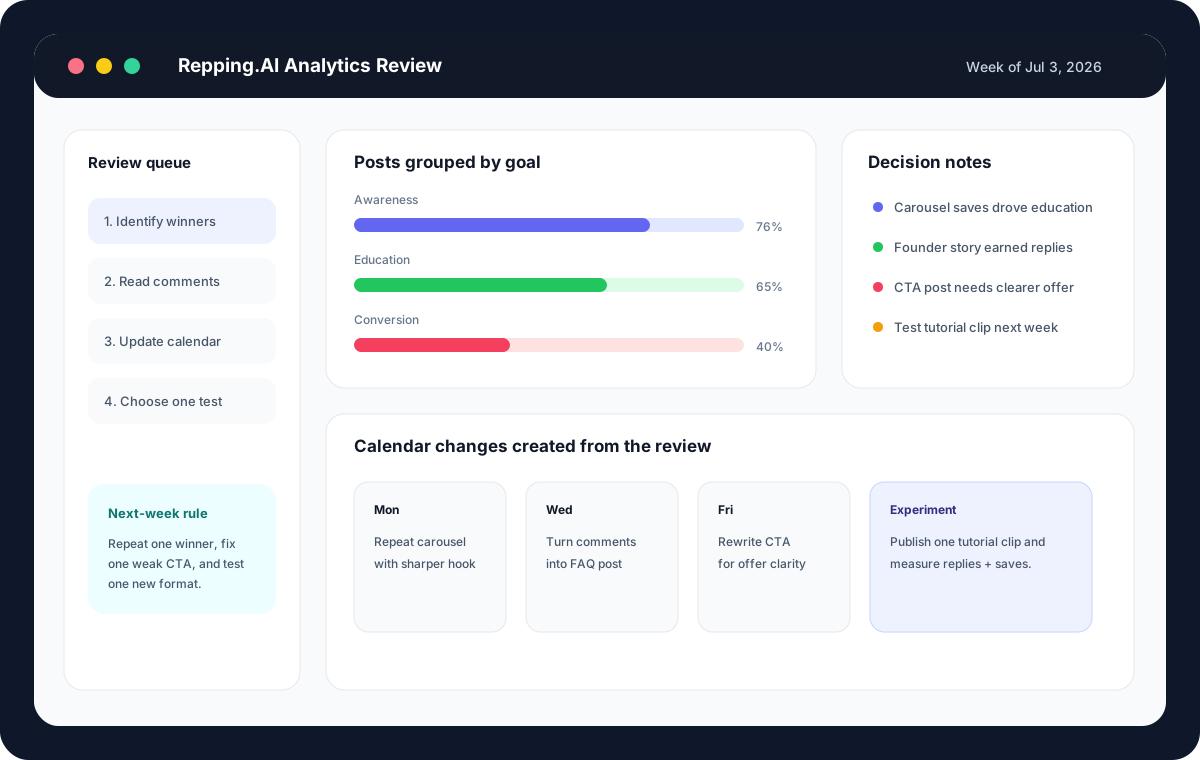
A weekly social media report should answer four questions: what to repeat, fix, stop, and test. Group posts by goal, compare them only within their group, copy real audience phrases from comments and DMs, and end with a short list of calendar changes. Thirty to forty-five minutes is enough for most creators.

Plan a creator product launch in three phases: pre-launch education, a launch window with a clear offer, and post-launch reinforcement. Start one to two weeks early, vary post types across teaching, proof, and objections, and disclose any partner or affiliate relationship in each post that needs it.

A social media approval workflow sets approval levels by risk: low-risk posts go to the channel owner, medium-risk posts to a manager or client, and high-risk posts to the person who owns the claim or offer. Use a short checklist, keep feedback attached to the post, and create fast lanes for recurring formats.

A LinkedIn content system gives each weekly post one job: teach, tell a story, show proof, answer an objection, or make a soft offer. Keep an idea bank, draft in batches, edit one post at a time, and schedule with time left to reply to comments. LinkedIn accepts scheduled posts 10 minutes to 3 months ahead.
Build a social media content calendar for a month in about an hour by choosing structure first: define three to five pillars (10 minutes), map them to a weekly grid (5), batch-write copy by pillar (35), and bulk-load the calendar into a scheduler (10). Plan two to four weeks ahead and leave open slots for timely posts.
Turn the advice into a workflow
Every article connects back to a Repping.AI product surface, so readers can move from learning to scheduling, analyzing, and publishing without hunting for the next step.
About these guides
Repping.AI publishes this library for creators planning, drafting, and reviewing social content. The Repping.AI Team byline identifies the product team, not an independent testing organization.
Some workflow guides use generated templates adapted to a topic and audience. Their examples illustrate a process; they do not report customer results or measured performance.
Free tool pages describe the browser tool and its limits. Calculator examples use stated formulas. Posting windows and budget estimates require checks against your own data.
Comparison pages reference official vendor descriptions. They disclose the review date and exclude claims about untested accounts or current prices.
We check platform rules, limits, and policy claims against the platform's own help pages, public documentation, or regulator guidance. Each cited source shows the date we last opened it. When we cannot read a primary source, we leave the claim out. We review a post when we edit it, and the "Last reviewed" label shows the date of that review.
For a correction, contact Repping.AI with the page URL and supporting evidence.
Put your ideas to work with Repping.AI
You are on Repping.AI Learn. Visit the main site to explore the product, compare plans, or create your account.